*The source code created for this blog post can be found here. In the previous blog posts in the SSIS in Azure series, we created a SSIS package to periodically ingests data from Azure SQL database to Azure Data Lake Store and deployed the package in the Azure-SSIS Integrated Runtime. Up to this point, we have … Continue reading SSIS in Azure #3 – Schedule and Monitor SSIS Package Execution using ADF V2
Category: SSIS/SSAS/SSRS/MDX
SSIS in Azure #2 – Deploy SSIS Packages to Azure-SSIS Integration Runtime in ADF V2
In the first blog post of the SSIS in Azure series, I gave a demonstration on how to create SSIS packages to move data in cloud, using a common use case that periodically ingests data from Azure SQL database to Azure Data Lake Store. In the pre-ADF V2 era, we can only deploy SSIS packages … Continue reading SSIS in Azure #2 – Deploy SSIS Packages to Azure-SSIS Integration Runtime in ADF V2
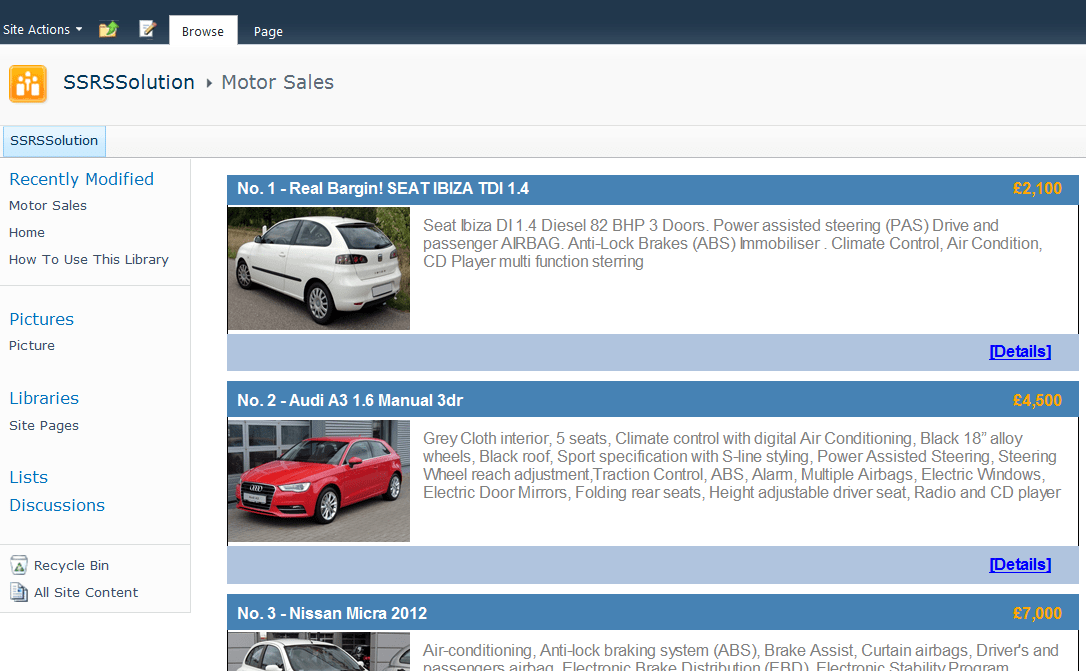
Building SharePoint Solutions using SQL Server Reporting Services
There are many options available for building SharePoint-based applications. This blog post introduces another non-traditional option - building SharePoint application using SQL Server Reporting Services. To introduce this approach, I will demo how to create a simplified second-hand car listing solution (within less than one hour): Firstly, we go to a Sharepoint site and create … Continue reading Building SharePoint Solutions using SQL Server Reporting Services
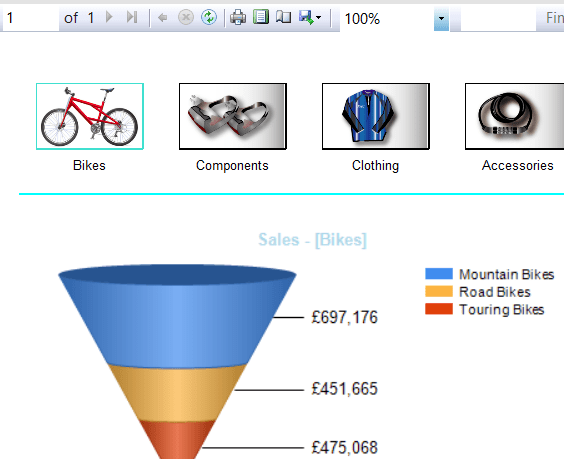
Creating PowerView Style Filters on SQL Server Reporting Services Reports
PowerView, the new commer of Microsoft reporting tools family, empowers report builders to create eye-catching reports with wow-factors in a rather simple way. One nice feature offered by PowerView is the image-based filter. Obviously, it would produce much better user experience compared to the drop down style filter in SSRS. Not only it looks much nicer, but … Continue reading Creating PowerView Style Filters on SQL Server Reporting Services Reports
MDX #5 – Product Sales Growth Analysis
Business Question 1: What are the top(n) products with highest sales growth from previous year in each sales territory? Firstly, we need get the sales of previous year using ParallelPeriod method and then calculate the sales growth (%) by comparing the sales of current year aganist previous year. We will then combining GENERATE and TOPCOUNT … Continue reading MDX #5 – Product Sales Growth Analysis
Creating SSAS Partitions through Directly Modifying XML Source file
I have met a very strange issue when I was creating SSAS partitions using Partition Wizard in SSDT 2012. I have gone through all the steps in Partition Wizard successfully, but no partition was created although everything seems running fine. Although I have managed to create the partitions in the SQL Server Management Studio with no problem, … Continue reading Creating SSAS Partitions through Directly Modifying XML Source file
MDX #4 – Sales Ratio aganist Parent Levels
Business Question 1: How much sales percentage does each product sub-category take aganist the total sales of 'Components' cateogry in 2007 In the example above, the .parent is used to return the current product's parent category. Alternatively, ANCESTOR function can also be used which could specify the level of the category (e.g, we hope to get the percentage of current … Continue reading MDX #4 – Sales Ratio aganist Parent Levels
MDX #3 – Year-Over-Year Comparison within Given Period
Requirement: Users specify a date range by giving a Start Date and a End Date, and expect to make Year-Over-Year comparison of a measure (e.g. Sales Amount) in the given period. For example, a user input start date as "04/07/2007" and end date as "04/11/2007", and want to compare the sales between the period "04/07/2007 - 04/11/2007" … Continue reading MDX #3 – Year-Over-Year Comparison within Given Period
MDX #2 – Top (n) Products Sales in each Sales Territory
To get top (n) products with highest sales in every sales territory, the GENERATE function is exactly what we need which applies a set to each member of another set.
MDX #1 – Year-Over-Year Comparison
1. Monthly or Quarterly Year-Over-Year Comparision PARALLELPERIOD is the function to get the same period in previous year. 2. YTD Year-Over-Year Comparison YTD function can be used to get the period from start of this year to current date. To get the same YTD period in last year, we could combine the YTD and PARALLELPERIOD … Continue reading MDX #1 – Year-Over-Year Comparison
 Data Ninjago (Finsight-Tech Blogs)
You must be logged in to post a comment.