
What makes me buy into DolphinDB:
- Friendly DolphinDB – Cross-Exchange Arbitraging Case
- Speedy DolphinDB – Why is DolphinDB so fast?
- Robust DolphinDB – Reliable, Scalable, Resilient, Consistent, and Monitorable
- Cost Effective DolphinDB – Worth the Money
- DolphinDB – An Integrated Financial Data Platform, Not Just a Time-Series Database
I reckon there is no doubt that kdb+ has played a dominant role in the financial time-series database domain over the last 20 years, especially in use cases like High-Frequency Trading (HFT), Market Making, Real-Time Risk Management, and Algorithmic Trading.
Its performance advantages, particularly in low-latency data processing and real-time analytics of time-series data, have made it famous in the financial sector. Along with its reputation for performance, it is also well-known for its high costs and steep learning curve, which can make it feel exclusive, like an “elitist” club, and not very “friendly” and welcoming to our “normal” people.
I am personally a ‘cult follower’ of DolphinDB, the competitor and challenger to kdb+. Not only is it faster than kdb+, but it also comes with a well-designed distributed architecture that makes it highly scalable. More importantly, it’s a whole lot more affordable than kdb+, which opens the door for small and medium-sized financial institutions to get in on the action
However, what impresses me most about DolphinDB is the simplicity and neatness of its programming language and syntax. Unlike the complex and cryptic q language of kdb+, DolphinDB’s scripting feels like a breeze. If you already know SQL and Python, you should be able to pick up the language right away. Even better news is that DolphinDB has encapsulated the complexity of streaming programming and hidden it away. You can build a streaming application easily and quickly, even without knowledge of the underlying streaming process mechanism.
In this blog post, I’ll demonstrate the points I’ve made by walking you through a cross-exchange arbitrage use case, showcasing just how simple it is to develop with DolphinDB. Cross-exchange arbitrage is a popular strategy, especially in cryptocurrency trading. It involves analysing market data in real-time to quickly spot arbitrage opportunities—before competing traders can take advantage of the price differences across exchanges.
For this demo case, I will use a single stream table to receive and cache market quotes, along with a subscriber that subscribes to the stream table, where the cross-exchange arbitrage logic is implemented in its handler function.
Create DolphinDB Stream Table
First, we create a DolphinDB stream table with just a single line of code. For our use case, we only need the latest market quotes for detection, so there’s no need to persist the data to the file system. The table will be created in-memory with the given column names and types. Here, I use a keyedStreamTable to eliminate duplicate market quote rows. To make the stream table accessible across all nodes in the DolphinDB cluster, you can use the share command.

Once the stream table is created, we can ingest market data into the table. DolphinDB comes with two built-in plugins, WebSocket and HttpClient, to support fast data ingestion from WebSocket APIs and HTTP REST APIs of market data vendors. DolphinDB also provides Kafka plugins for consuming data from message brokers. Since this demo focuses on DolphinDB streaming processing development, data ingestion is not the primary focus of this blog post. Instead, it will be covered in a future discussion on market data center solutions.
DolphinDB comes with a powerful real-time dashboard builder, enabling business analysts and developers to create animated, real-time dashboards to visualize data in both stream tables and persistent tables. For the stream table created earlier in this demo, I quickly put together a line chart to visualize the quote differences between the Binance and Huobi exchanges over time.

Implement Arbitraging Strategy
To execute the arbitrage strategy in real-time, we can create a subscriber that subscribes to the stream table and implements the strategy logic in the handler function, cross_exchange_arbitrage, of the subscriber. Once a new message flows into the stream table, the handler function will be called. We set msgAsTable to ‘false’ so that new quotes are handled as soon as they arrive in the stream table.
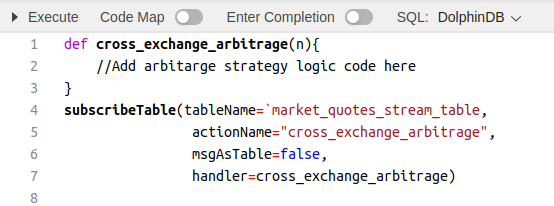
To demonstrate how to write streaming analytics code in DolphinDB, I will put together a simple script that compares the ask quote of one exchange (the price to buy there) with the bid quote of another exchange (the price to sell there) in order to detect price differences large enough to generate a profit. For this demo, cost management and pre-trade risk control logic have not been considered.
First, let’s take a look at the following script. Yes, you’re right! That’s DolphinDB’s language for querying and analysing tables, whether they are in-memory tables, stream tables, or partitioned persistent tables.

DolphinDB supports the ANSI SQL standard—and goes even further. As a time-series database, DolphinDB includes a wide range of built-in functions to simplify time-series operations. For example, from the output of the query above, we can see that there are null values after pivoting. We need to fill these null cells with the previous non-null value for each quote column. In standard ANSI SQL, achieving this would require writing complex subqueries, window functions, or using OUTER APPLY. However, in DolphinDB, you can simply call the built-in forward-fill function ffill() in the SELECT clause.
In addition, DolphinDB’s language is very flexible. For example, as shown in the code snippets below, we can define a variable outside of SQL statements and reference it directly within the SQL statements. This makes the code much simpler and neater. Like this, DolphinDB has implemented many “syntactic sugar” to simplify the code writing. Some of my favourites includes context by, exec, panel etc.

The code snippets above implement our arbitrage opportunity detection logic, using nearly standard SQL. I don’t think there’s much to learn here for someone who already knows SQL.
Now, let’s move on to integrating the code snippets above into our streaming subscriber handler function. In many Python-like languages, the typical approach to embedding an SQL query is to place it in a string and pass it to some kind of “run SQL” command. DolphinDB makes this process incredibly simple (and honestly, I can’t think of a simpler way). All we need to do is assign the SQL statement to a variable and reference the results from that variable, as shown in the code snippets below.
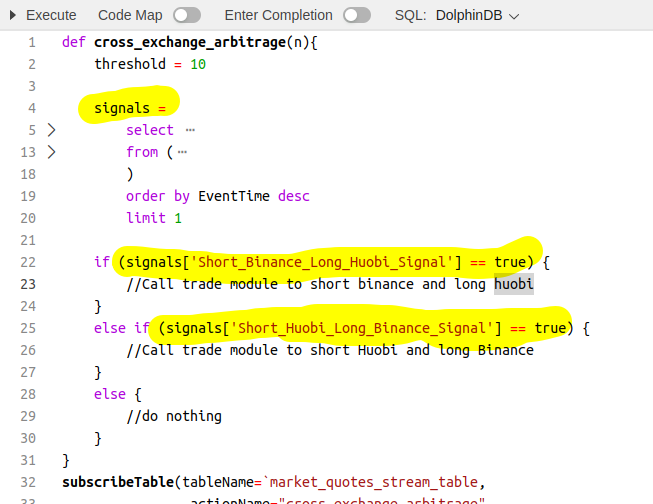
In summary, I really appreciate the simplicity of DolphinDB. I think the DolphinDB language is one of those that the more you use it, the more you become addicted to it. For example, the way to define a string array (as shown in the code below) felt a bit unfamiliar when I first started using it, but once I got used to it, I simply can’t stand other methods, which now feel too cumbersome in comparison.

 Data Ninjago (Finsight-Tech Blogs)