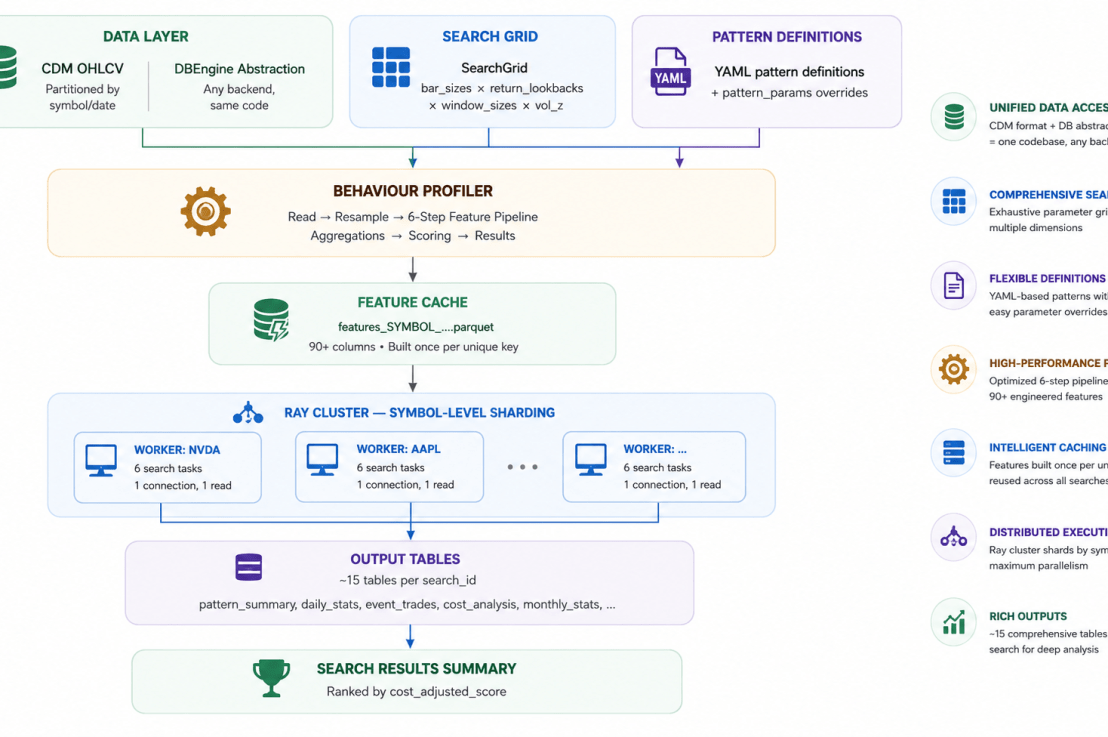
Every stock behaviour pattern has parameters. A compression breakout depends on the rolling window. A VWAP reclaim depends on the volume threshold. A failed breakout depends on the forecast horizon. Change one number and a “profitable” pattern becomes noise.
The typical workflow: tweak a parameter → rerun → query results → squint at a table → tweak again. It’s slow, it’s biased (you find what you expect to find), and it doesn’t scale beyond two or three parameters. When parameter interactions are non-linear — and they always are — one-at-a-time tuning leaves most of the space unexplored.
QuantFlow takes a different approach: declare the entire search space in YAML, let the system exhaustively evaluate every combination, and rank the results by cost-adjusted performance. No priors, no hunches — just data.
But brute-force sounds expensive. A thousand symbols × six parameter combos × 90+ features × 15 aggregation tables = a lot of compute. The real question isn’t why brute-force — it’s what kind of architecture makes this practical?
The Parameter Space
Here’s an example of search configuration from a QuantFlow project:
# quantflow_project.yml — behaviour_profiler.search section
search:
  enabled: true
  bar_sizes: ["1min"]
  return_lookbacks:
    - [5, 15]
  forecast_horizons:
    - [15, 30, 60]
  window_sizes:
    - [20, 30]
    - [20, 30, 60]
  volume_z_thresholds: [1.5, 2.0, 2.5]
  patterns:
    - compression_breakout_up
    - compression_breakout_down
    - failed_breakout_up
    - failed_breakout_down
    - vwap_pullback_long
    - vwap_pullback_short
    - vwap_reclaim_hold
    - vwap_reject_hold
    - volume_climax_top
    - volume_climax_bottom
    - trend_pullback_resume_up
    - trend_pullback_resume_down
    - green_streak_3
    - red_streak_8
  output_schema: "eda_search_v7"
Each axis controls a different dimension of pattern behaviour

Combinatorics: 1 bar_size × 1 return_lookback × 1 forecast_horizon × 2 window_sizes × 3 vol_z = 6 search tasks per symbol. With 1,000 symbols → 6,000 independent evaluations, each producing ~15 output tables.
Beyond single-symbol patterns, QuantFlow also supports lead-lag pairs — leader→follower relationships like QQQ→NVDA or NVDA→AMD — with their own pattern conditions and aggregation chain. But let’s focus on the single-symbol path first; lead-lag works the same way under the hood.
The Pattern System
The pattern system is the user-facing surface of the behaviour profiler. Everything is configurable — you never touch Python to add, modify, or sweep a pattern.
QuantFlow YAML-defined patterns ship with 22 built-ins across 7 categories (breakout/, vwap/, reversal/, trend/, relative/, streak/, opening/). Here’s an example:
# patterns/defaults/breakout/compression_breakout_up.yml
name: compression_breakout_up
window_sizes: [20, 30, 60]
direction: 1          # +1 = long pattern, -1 = short, 0 = neutral
category: breakout
description: "Low volatility compression then upside breakout with range expansion"
conditions:
  - {column: "close", op: "gt", value_ref: "rolling_high_{window}"}
  - {column: "above_vwap", op: "true"}
  - {column: "volume_z_tod", op: "gt", value: 2.0}
  - {column: "range_zscore_20", op: "gt", value: 1.0}
  - {column: "close_position_in_bar", op: "gt", value: 0.7}
  - {column: "rolling_vol_percentile_{window}", op: "lt", value: 0.4}
A pattern is just a name, a direction, and a list of conditions AND’d together. Each condition compares a feature column against a literal (value) or another column (value_ref). The {window} placeholder automatically expands one definition into multiple variants — compression_breakout_up_20, 30, 60.
Bring your own patterns — three mechanisms, zero Python:
- custom_patterns_dir: Point to a directory of your own YAML files. The profiler loads them at startup. Your patterns can reference any of the ~90 feature columns.
- pattern_params overrides: Control window sizes per-pattern without editing YAML:
- patterns_include / patterns_exclude: Filter which patterns to run. In search mode you might include only breakout and reversal patterns. In production you might run all 44+.
How conditions compile — the YAML loader translates declarative conditions into optimized Polars expressions:
# YAML: {column: "close", op: "gt", value_ref: "rolling_high_20"}
#   → pl.col("close").gt(pl.col("rolling_high_20"))

# YAML: {column: "volume_z_tod", op: "gt", value: 2.0}
#   → pl.col("volume_z_tod").gt(2.0)

# YAML: {column: "above_vwap", op: "true"}
#   → pl.col("above_vwap")

# All conditions AND'd together → single boolean column:
#   event_compression_breakout_up_20
The result: a PatternRegistry with 44+ entries, each producing a boolean event_* column in the feature DataFrame. Every pattern — built-in YAML, custom YAML, or programmatic — flows through the same aggregation and scoring pipeline. The grid search doesn’t know or care where a pattern came from.
“YAML is the API.” Define a new pattern. Add it to a grid search. Get a ranked score back. The feature columns, condition compiler, aggregation engine, and scoring formula are all generic infrastructure. Your domain knowledge goes in the YAML.
The Architecture That Makes It Practical
Without the right foundation, brute-force grid search at this scale demands more than just compute, but also efforts on data collection and processing, data quality assurance, optimised resource usage and cost control, time to write and maintain the logic, and data analysis. QuantFlow replaces all of these with architecture. Four design decisions eliminate the toil:
1. Data Foundation: CDM + DBEngine Abstraction
QuantFlow sits on a Common Data Model (CDM). All OHLCV data is stored once, partitioned by symbol and date, and queried through a single interface. The DBEngine abstraction (quantflow.io.base.DBEngine) means the same code runs against any backend — distributed query engines for production scale, local engines for development — with zero code changes between them.
The behaviour profiler never hardcodes a table name or connection string. Everything is resolved at startup:
Project YAML → ConfigResolver → ProfilerConfig
  ├── catalog: quantflow_canonical     (where CDM lives)
  ├── source_table: cdm.cdm_ohlcv      (1-min OHLCV, partitioned)
  ├── engine_type: <backend>           (swap via one config line)
  ├── output_catalog: quantflow_research
  └── output_schema: eda_search_v7
DBEngine.read_arrow(table, filters, order_by) returns a pyarrow.Table. The profiler doesn’t care which engine is behind the abstraction – it could be a distributed query engine scanning millions of data files, or a local embedded database. The code path is identical.
2. Feature Caching: Compute Once, Sweep Cheaply
The expensive part of the pipeline is feature engineering — a 6-step Polars lazy pipeline that transforms raw 1-minute OHLCV into ~90 derived columns:

After the pipeline: external joins add market regime labels (from SPY: risk_on/risk_off, high_vol/normal_vol/low_vol) and market-relative returns.
Grid search is iterative by nature. You run it, study the results, adjust the search space (different window_sizes, tighter volume_z_thresholds, new patterns), and run again. Without caching, every run rebuilds the same 90-column feature DataFrame from scratch — the most expensive step in the pipeline, repeated for every symbol, every time.
With caching, only the first run pays that cost. The 90-column feature DataFrame is built once per symbol, written to cache, and silently reloaded on every subsequent run. You iterate on the search space; the data layer doesn’t move.
3. Symbol-Level Ray Sharding — Why “More Parallel” Is Actually Slower
There are two ways to distribute a grid search across Ray. The intuitive choice is wrong.
Approach A — Task-level: one Ray task per (symbol, search_task) pair. 1,000 symbols × 6 tasks = 6,000 Ray tasks. Each task independently connects, reads OHLCV, builds features, writes results, and disconnects. 6,000 tasks sounds massively parallel — that’s 6× the parallelism, right?
Approach B — Symbol-level (SymbolSearchShard): one Ray task per symbol, all search combos inside that worker. Only 1,000 tasks — seems under-parallelized.
The intuition that more tasks = more speed is correct when you’re CPU-bound. But the grid search is I/O-bound. The dominant cost isn’t computing features or running aggregations — it’s reading raw OHLCV from the data layer. A single stock’s 1-minute bars over 5 years is ~1 million rows, well under 100 MB. That read takes seconds. Computing 90 features from it in Polars takes milliseconds.
Task-level reads the same data 6 times. The feature cache saves the feature build but not the raw OHLCV read — each task still hits the data layer independently. You’re paying the I/O tax 6,000 times instead of 1,000, and the extra “parallelism” just means more tasks queueing for the same data.
Task-level (6,000 tasks):       Symbol-level (1,000 tasks):

NVDA/s0001 ── read NVDA ──┐    NVDA ── read once ──┐
NVDA/s0002 ── read NVDA ──┤                        │
NVDA/s0003 ── read NVDA ──┤                        ├── s0001
NVDA/s0004 ── read NVDA ──┤    same bytes          ├── s0002
NVDA/s0005 ── read NVDA ──┤    6× from data layer  ├── s0003
NVDA/s0006 ── read NVDA ──┘                        ├── s0004
                                                    ├── s0005
AAPL/s0001 ── read AAPL ──┐                        └── s0006
AAPL/s0002 ── read AAPL ──┤
...            ...         │    AAPL ── read once ── ... (same)

6,000 I/O operations total     1,000 I/O operations total
Symbol-level reads once, builds features once, and reuses both across all parameter sweeps within the same worker process:
┌─────────────────────────────────────────────────────────┐
│ Ray Worker (NVDA)                                       │
│  engine.connect()       ← one DB session                │
│  read OHLCV             ← one read, ~1M rows in memory  │
│  build features         ← one feature build (cached)    │
│  pre-compute SPY regime labels (once, shared)           │
│  loop: s0001 → s0002 → s0003 → s0004 → s0005 → s0006   │
│         ↑ same feature DataFrame, different parameters  │
│  engine.close()                                         │
└─────────────────────────────────────────────────────────┘

... 1,000 workers, max_ray_tasks=64 concurrent
What about the memory argument? — “What if one symbol’s data is too big for a single worker?” For the target use case — individual stock 1-minute OHLCV with ~5 years of history — this never happens. A million rows at ~30 columns is under 100 MB. Even the most liquid names (SPY, NVDA) stay within that range.
The boundary where this breaks: intraday tick data, or 1-second bars over multi-decade histories, or futures with 23-hour sessions. Those could push into gigabytes per symbol. In that world you’d partition by time within a symbol (one task per symbol-month, say), or switch to task-level and accept the I/O cost because the memory constraint is harder. But for the problem the behaviour profiler actually solves — discovering patterns in 1-min stock bars — the data fits comfortably, and symbol-level strictly dominates.
QuantFlow ships both implementations (SearchShard and SymbolSearchShard in ray_tasks.py). run_search_ray() uses SymbolSearchShard because within the profiler’s target domain, the I/O argument is decisive.
4. Polars Lazy Evaluation
The feature pipeline is built entirely with pl.LazyFrame.pipe(). No data is materialized until the final .collect(). Polars’ query optimizer reorders filters, prunes unused columns, and fuses operations across pipe boundaries. What looks like the separate transformation passes is compiled into a single optimized query plan by the Polars engine.
How Ray Executes the Search
Step 1: Grid Expansion
SearchGrid.expand() computes the Cartesian product of all parameter axes, producing a flat list of SearchTask objects. Each task gets a unique, human-readable search_id:
s0001_1min_rl5_15_fh15_30_60_ws20_30_vz2p0
  │      │   │       │         │       │
  │      │   │       │         │       └─ vol_z = 2.0
  │      │   │       │         └─ window_sizes = [20, 30]
  │      │   │       └─ forecast_horizons = [15, 30, 60]
  │      │   └─ return_lookbacks = [5, 15]
  │      └─ bar_size = 1min
  └─ sequence number 0001
Window-aware patterns are auto-detected from YAML conditions — the system scans for {window} placeholders and knows which patterns need per-task window_sizes overrides. No hardcoded lists.
Step 2: Dispatch
run_search_ray() groups tasks by symbol, creates one SymbolSearchShard per symbol, and submits them to Ray. Concurrency is controlled by max_ray_tasks (default 8, configurable):
# runner.py — one shard per symbol, not per task
shards = []
for symbol in config.symbols:
    shards.append(SymbolSearchShard(
        symbol=symbol,
        search_tasks=[...all 6 task dicts...],
        ...
    ))
futures = [_process_symbol_search.remote(s) for s in shards]
Step 3: Inside Each Worker
Each processsymbol_search() Ray remote:
- Opens one read engine + one write engine connection
- Reads the symbol’s OHLCV data once
- Builds features once (cache-aware — skips if .cache/ has it)
- Pre-computes SPY market regime labels and proxy returns (shared across all search tasks)
- Loops through search tasks: for each, creates a ProfileSpec, calls runbehaviour_profile(), writes ~15 output tables
- Closes connections
Different window_sizes and vol_z values reuse the exact same feature DataFrame.
Step 4: Post-Processing
After all Ray tasks complete, compute_search_summary() reads every pattern_summary_s* table, parses the search_id to extract parameter values, computes per-search-id aggregate metrics, and writes a ranked search_results_summary table.
Lead-Lag: When One Stock Leads Another
Beyond single-symbol patterns, the behaviour profiler handles lead-lag relationships — pairs where one instrument’s price action predicts another’s. Think QQQ→NVDA (the ETF moves first, the component catches up) or NVDA→AMD (the sector leader drags the runner-up).
The pipeline is the same shape as single-symbol analysis, but with an extra join step:
Leader features (QQQ)  ──┐
                          ├── time-align on datetime ──→ lead-lag features
Follower features (NVDA) ─┘                               (ll_* condition columns)
                                                               │
                                          ┌────────────────────┘
                                          ▼
                                    daily → monthly → summary
                                    (same aggregation chain)
The time-aligned frame computes three structural columns:

From these, nine boolean ll_* condition flags are derived:

These feed into the same layered aggregation and scoring pipeline as single-symbol patterns. The only difference is the group key: (leader_symbol, follower_symbol, condition_name, direction, horizon_minutes) instead of (symbol, pattern, …). The buildpattern_summary() function in shared.py handles both cases through a single parameterized implementation — same behaviorscore, same cost_adjusted_score, same monthly_t_stat.
The lead-lag config mirrors the single-symbol config exactly:
lead_lag:
  enabled: true
  profiles:
    - name: "intraday_lead_lag"
      bar_size: "1min"
      return_lookbacks: [5bar, 15bar]
      forecast_horizons: [15bar, 30bar, 60bar]
  patterns:
    include:
      - ll_leader_momentum_up
      - ll_leader_breakout_catchup
      - ll_beta_adjusted_gap
      # ...
  pairs:
    - {leader: "QQQ",  follower: "NVDA"}
    - {leader: "QQQ",  follower: "AAPL"}
    - {leader: "NVDA", follower: "AMD"}
    - {leader: "SPY",  follower: "TSLA"}
In Ray search mode, lead-lag pairs multiply the search space further — each pair is an additional evaluation dimension. But the same architecture (feature caching, symbol-level sharding, lazy evaluation) keeps it practical.
What You Get Out
The final scoring produces four metrics per pattern:
behavior_score      = median_monthly_directional_effect × positive_month_ratio × sample_weight
sample_weight       = min(1.0, log(1 + total_events) / log(1 + target_event_count))
cost_adjusted_score = behavior_score − est_round_trip_cost
monthly_t_stat      = mean_monthly_effect / (std_monthly_effect / √active_months)
Key design decisions:
- sample_weight penalizes low-sample patterns — a pattern that fired 50 times is less trustworthy than one that fired 1,000 times. The log scaling means the penalty is severe at very low counts but tapers off.
- cost_adjusted_score accounts for slippage and commissions, estimated from the symbol’s average spread and dollar volume. A pattern with a high raw score but trading in illiquid names gets downgraded.
- monthly_t_stat measures statistical significance — is the pattern’s monthly return consistently positive, or just lucky?
After the search completes, search_results_summary gives you a ranked leaderboard:

You can immediately see which parameter combinations work best — and drill into the per-pattern detail tables (pattern_summary_s0003_*) to inspect t-statistics, win rates, sample counts, and regime-specific breakdowns.
The full workflow, end to end:
- Declare your search space in YAML (~10 lines)
- Run: python -m quantflow.research.behaviour_profiler.runner search –ray –project-dir .
- Query search_results_summary → top parameter combos
- Drill into pattern_summary_s0003_* → per-pattern details
- Validate top candidates out-of-sample before trading
No loop of manual tweaking. No confirmation bias. The data tells you what works.
Limitations & What’s Next
The grid search is exploratory data analysis — it’s designed to surface promising patterns and parameter ranges from the data, not to certify them for trading. Think of it as a high-throughput screening tool: it tells you where to look, not what to bet on.
The gap between discovery and deployment matters because financial data violates the assumptions of standard ML evaluation:
- Serial correlation: Observations overlap. A 15-bar return measured at bar t shares 14 bars with the measurement at bar t+1. Random train/test splits leak information.
- Multiple testing: 6,000 evaluations × 44 patterns × 3 horizons = hundreds of thousands of implicit hypothesis tests. Some will look good by chance.
- Non-stationarity: Market regimes shift. A pattern that worked in 2021’s low-vol bull market may fail in 2022’s rate-hiking cycle.
These aren’t bugs in the current pipeline — they’re deliberate scope boundaries for the EDA phase. The production pipeline would incorporate the framework laid out by Marcos López de Prado in Advances in Financial Machine Learning:

The behaviour profiler already produces the inputs this pipeline needs: clean feature DataFrames, compiled pattern conditions, and structured aggregation tables. The next step is hooking those into a purged, deflated, cross-validated evaluation loop — and only then feeding the survivors to a backtesting engine.
Key Architecture at a Glance

 Data Ninjago (Financial Data Architecture)