Financial semantics are never finished.
Products evolve. Industry standards release new versions. Institutions replace applications, redesign data platforms and introduce new controls. New analytical and AI workflows also require additional context that may not have been anticipated when the original models were created.
The challenge is therefore not simply to define financial meaning once.
It is to create a structure in which that meaning can continue to evolve without forcing every connected model, system and workflow to change at the same time.
The Finsight Semantic Repository is designed for this purpose.
It provides a reusable, governed representation of financial meaning, while allowing each institution to add its own systems, data estate, mappings, ownership and workflow knowledge through a client overlay.
The previous article introduced the Business, Canonical, Physical and Mapping Layers. This article focuses on how those semantics are organised into repositories, how the repository is compiled for runtime use, and how client-specific semantics can be added without modifying the reusable Finsight foundation.
How the Semantic Repository works
Declarative
The Semantic Repository is designed as a declarative model. It describes what semantic artefacts exist, what they mean, how they relate and how they map to data, without embedding the application logic that executes or consumes them.
This keeps semantic definitions independent from the runtime implementation. A business concept, canonical structure, physical mapping or validation rule can evolve without requiring changes to the code that loads the repository, builds graph indexes or supports AI workflows.
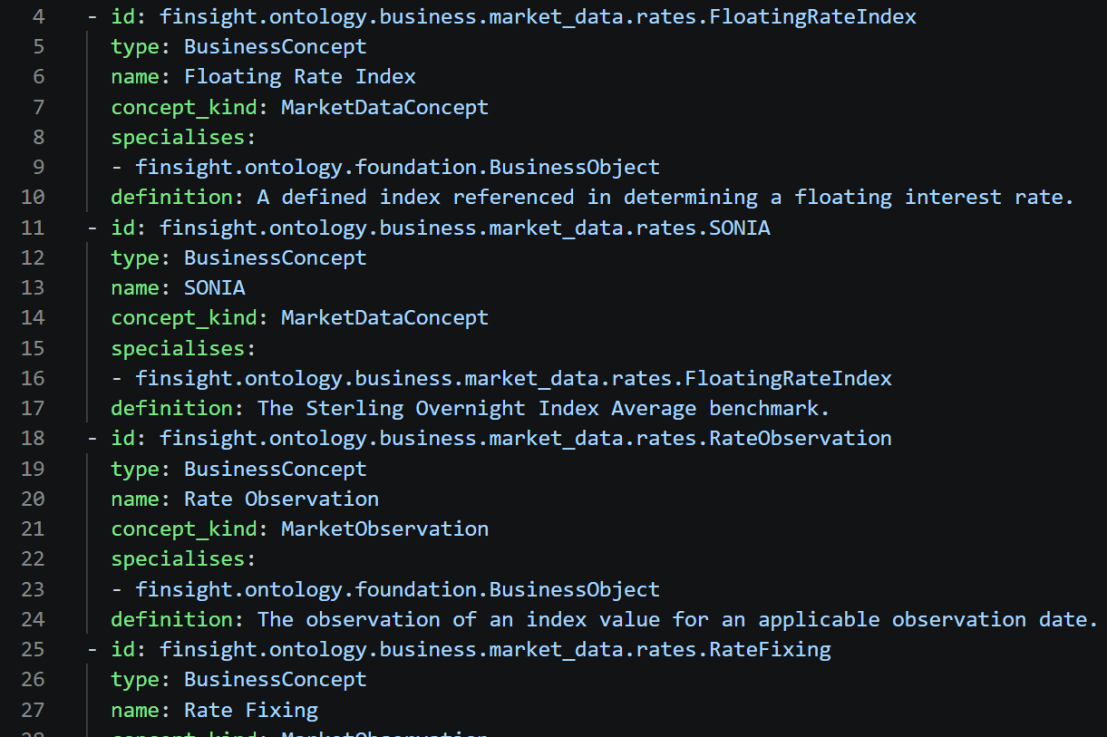
The current implementation uses human-readable YAML files because they provide a practical way to express structured semantic definitions.
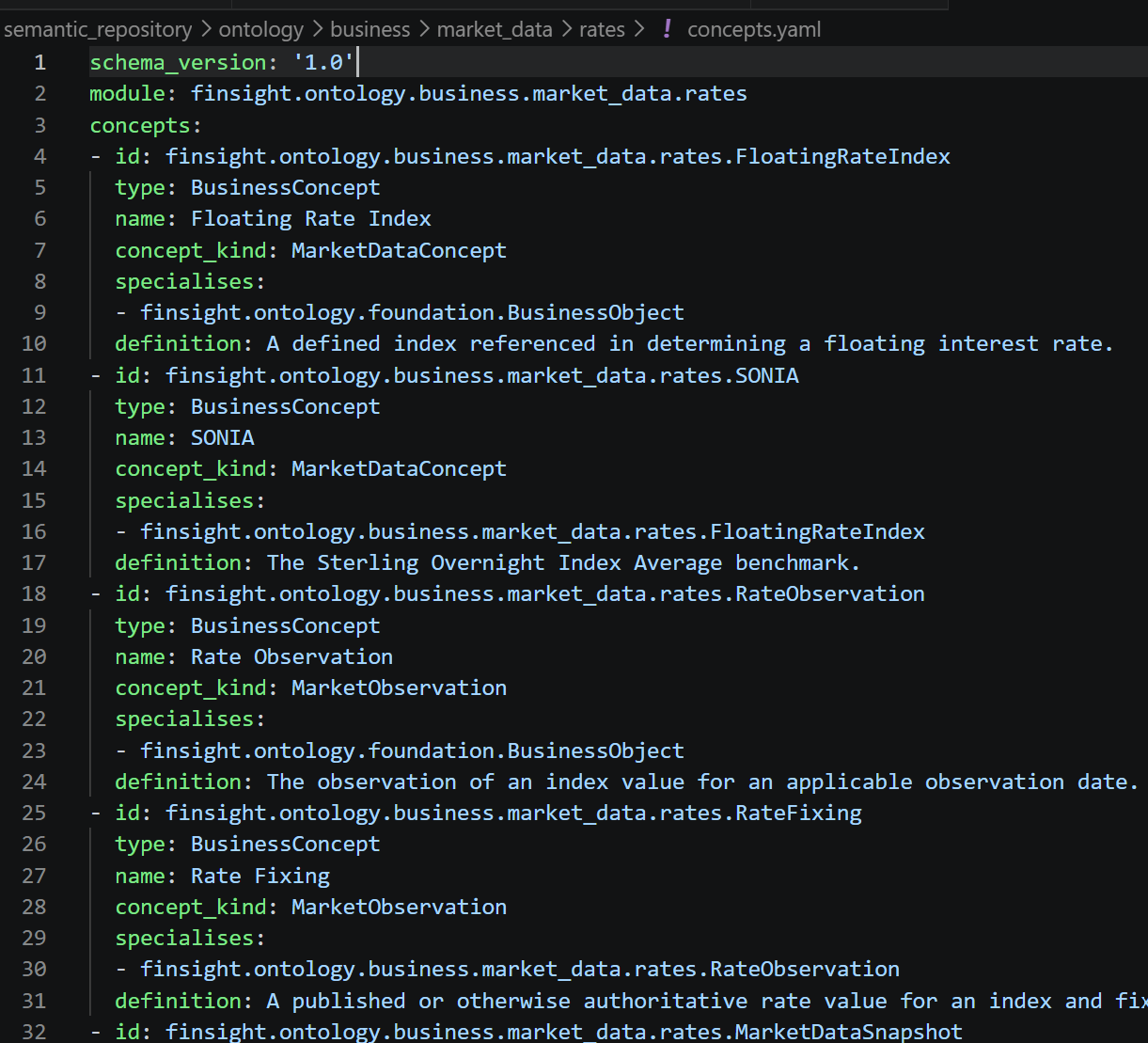
YAML is the current source representation, but it is not the architectural principle. Other formats could be supported in the future, provided they conform to the same semantic contracts and compilation process.
The important design choice is that the repository defines meaning declaratively. The runtime determines how those definitions are loaded, validated, indexed, queried and used by applications.
Packaged and versioned
The Semantic Repository is organised into packages so that different parts of the model can be developed, governed and released independently.
A package may represent a financial business domain, a group of FINOS CDM-aligned canonical artefacts, a source system, a technology platform, a mapping domain, a client extension or a workflow-specific knowledge set.
The package identifier reflects where the package belongs and what it contains. For example:
finsight.core.common-typesfinsight.business.capital-markets.tradesfinsight.canonical.finos-cdm.payoutfinsight.standards.finos-cdmfinsight.technology.bigqueryfinsight.workflow.exception-rcaclient.example-client.physical.murex.trade-reportclient.example-client.mapping.murex-to-cdmclient.example-client.business-extension.trade-surveillanceclient.example-client.workflow-extension.exception-rca
The identifier follows a hierarchical naming convention:
<repository-owner>.<semantic-area>.<domain-or-system>.<package>
This naming structure makes package ownership, scope and purpose visible from the identifier itself. It also reduces the risk of naming conflicts when shared Finsight semantics and client-specific extensions are loaded into the same repository.
Each package has a stable identifier and a separately managed version.
finsight.business.capital-markets.trades@1.2.0finsight.canonical.finos-cdm.payout@2.0.0client.example-client.mapping.murex-to-cdm@1.1.0
Keeping the version separate allows the package identity to remain stable as its content evolves. Packages can therefore be reviewed, versioned, released, upgraded or deprecated individually rather than treating the entire Semantic Repository as one indivisible artefact.
Compiled for runtime use
The declarative repository is the governed source of the semantic model, but runtime components do not repeatedly interpret individual YAML files during every query or workflow execution.
Instead, the Semantic Runtime loads the configured packages, validates their contents and compiles them into a resolved semantic snapshot.
During compilation, package dependencies are checked, compatible versions are resolved, references between artefacts are validated and relationships are converted into a consistent typed representation. Indexes can also be created for mappings, standards provenance, package membership and incoming or outgoing references.
The resulting snapshot represents a consistent view of the Semantic Repository at a particular point in time. Runtime components therefore work against a known and validated semantic state rather than independently interpreting a changing collection of source files.
The compiled snapshot can be exposed through NetworkX, Neo4j or another graph or indexing technology. These technologies provide different ways to store, traverse and query the model, but they do not define its meaning.
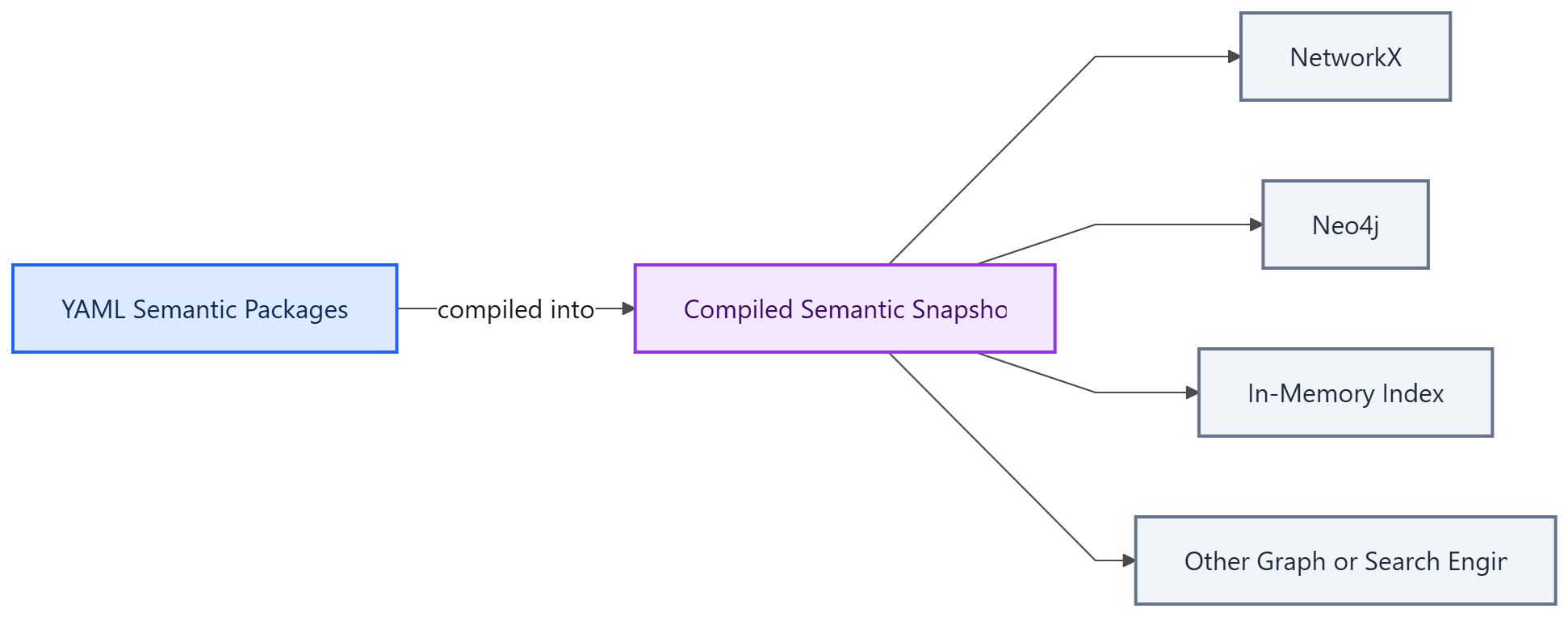
The semantic meaning remains in the governed repository. The compiled snapshot is its resolved runtime representation, while the graph engine and storage technology remain replaceable implementation choices.
How the repository is organised
At the top level, the Semantic Repository separates the semantic content from the structures used to manage, validate and govern it. A simplified repository may look like this:
semantic-repository/├── repository.yaml├── business/├── canonical/├── physical/├── mappings/├── standards/├── workflows/├── schemas/├── metadata/└── governance/
repository.yaml is the entry point. It identifies the repository, records its version and declares the packages that belong to it. The Semantic Runtime can therefore discover the repository from one controlled location rather than searching through directories and attempting to infer their purpose.
The remaining top-level areas fall into three broad groups:
- Semantic model: business, canonical, physical and standards
- Semantic connections and use: mappings and workflows
- Repository control: schemas, metadata and governance
This separation is intentional. The first group defines meaning, the second explains how that meaning is connected and applied, and the third controls how the repository is structured, validated and managed.
The semantic model
The main semantic content of the repository is organised into business, canonical, physical and standards areas. These areas describe different views of the same financial and institutional reality, and they are kept separate because each serves a different purpose.
The business area describes the financial domain in terms that business users, architects and engineers can understand without referring to a particular application, data structure or industry-standard implementation. Some package examples:
finsight.business.capital_markets.transactionsfinsight.business.capital_markets.productsfinsight.business.capital_markets.partiesfinsight.business.capital_markets.lifecyclefinsight.business.capital_markets.cashflows
The canonical area provides stable and reusable representations of that business meaning. These representations are designed to be shared across source systems, data platforms, applications and client implementations. Some package examples
finsight.canonical.basefinsight.canonical.party_and_clearingfinsight.canonical.tradefinsight.canonical.product.ratesfinsight.canonical.event
The canonical model is grounded in recognised industry standards wherever suitable standards exist. The repository follows a clear policy:
Use FINOS CDM for capital-markets party, trade, product, event, observation, cashflow and transfer structures. Use other recognised standards for operational concepts outside CDM. Define Finsight canonical artefacts only when no suitable external standard exists.
FINOS CDM is therefore the primary source for many capital-markets canonical artefacts, but it does not define the repository package hierarchy. Instead, the precise relationship with CDM is recorded as provenance within the relevant package or artefact.
id: finsight.canonical.trade.Tradetype: CanonicalEntitystandard_ref: standard: FINOS_CDM version: 6.23.0 reference: cdm.event.common.Tradeadoption: direct
This makes the relationship with the standard explicit and traceable. It also allows the Finsight package identity to remain stable when the underlying standard is upgraded.
The physical area describes how information is actually represented and operated within a financial institution.
Unlike the business and canonical packages, physical packages are normally client-specific because every institution has its own applications, platforms, schemas and operational processes. For example:
client.example_client.physical.murex.trade_reportclient.example_client.physical.bigquery.canonical_trade_storeclient.example_client.physical.kafka.trade_events
A physical package may describe a wide Murex trade-report table, a canonical trade store in BigQuery or a Kafka topic carrying lifecycle events. It can also record the wider institutional context, such as which application owns the data, which team operates it and which downstream process consumes it.
The physical model is therefore not limited to tables and fields. It represents the real operating environment in which financial information is created, transformed, controlled and used.
The business packages explain what something means. The canonical packages define how that meaning can be represented consistently. The physical packages describe where and how it exists within a particular institution. The standards area preserves the external provenance behind the canonical definitions.
Semantic connections and use
The mappings area connects the business, canonical and physical parts of the repository. For example:
client.example-client.mapping.murex-to-cdmclient.example-client.mapping.cdm-to-canonical-store
A mapping package explains how one representation relates to another. It can identify which physical field populates a canonical attribute, which transformation is required, how local terminology maps to a shared concept, and which validation rule should be applied.
Mappings are kept separate from the models they connect because they represent a relationship between models rather than belonging entirely to either side. A physical source can change without redefining the canonical model, and the mapping can be revised independently to accommodate that change.
The workflow area contains semantics that support a particular business or operational process:
finsight.workflow.exception-rcafinsight.workflow.data-feed-onboardingclient.example-client.workflow-extension.exception-rca
These packages do not contain the executable workflow implementation. Instead, they provide the knowledge that a workflow may need, such as diagnostic concepts, investigation rules, evidence requirements or workflow-specific relationships.
This keeps the knowledge used by a workflow visible and governable rather than hiding it inside application code. A client-specific workflow extension can also add institutional knowledge without modifying the shared Finsight workflow package.
Repository control
The final group contains the structures that make the repository manageable as an engineering and governance artefact.
The schemas area defines the structural contracts that repository documents must follow. It allows the loader to reject malformed definitions, missing required fields or unsupported values before they enter the compiled semantic model.
The metadata area contains repository-level definitions such as artefact types, package registries, naming conventions and validation profiles. These provide a common vocabulary for describing the repository itself.
The governance area records information such as ownership, approval status and lifecycle state. Its purpose is to show not only what a semantic artefact means, but also whether it is proposed, approved, active or deprecated, and who is responsible for it.
These supporting areas do not define financial meaning directly. They provide the controls required to manage that meaning consistently across packages, releases and client implementations.
Together, the top-level structure creates a clear separation between shared financial semantics, client-specific representations, mappings, workflow knowledge and repository governance. This allows each area to evolve independently while still being loaded and compiled into one connected semantic model.ptive.
How to add a client overlay
The shared Finsight repository provides reusable business semantics, canonical models, standards references and workflow knowledge. These definitions are intended to remain stable across institutions.
However, no shared repository can describe the complete operating environment of a particular client.
These institution-specific details should not be added directly to the shared Finsight packages. Doing so would mix reusable semantics with client implementation details and would make the common model increasingly difficult to maintain.
A client overlay provides the separation required to avoid this problem.
Creating the client repository
A client overlay starts with its own repository identity and an explicit dependency on the required Finsight packages.
For example:
repository: id: client.example_client version: 1.0.0dependencies: - package: finsight.business.capital_markets.transactions version: ">=1.0.0,<2.0.0" - package: finsight.canonical.trade version: ">=1.0.0,<2.0.0" - package: finsight.canonical.product.rates version: ">=1.0.0,<2.0.0"
These dependencies make the relationship between the client model and the shared foundation explicit. They also allow compatibility to be checked when either repository is upgraded.
The client repository then contributes packages under its own namespace:
client.example_client.organisationclient.example_client.physical.murex.trade_reportclient.example_client.physical.bigquery.canonical_trade_storeclient.example_client.mapping.murex_to_canonical_tradeclient.example_client.governance.trade_data_ownershipclient.example_client.workflow_extension.exception_rca
The namespace makes it clear that these packages belong to the client and are not part of the reusable Finsight foundation.
Describing the client’s operating environment
The first role of the overlay is to describe the institution as it actually operates.
A physical package may define a source-system report, a database table, a field, an API or an event topic. It can also place that data object within its wider operational context by identifying the system that owns it, the team responsible for it and the processes that consume it.
For example:
id: client.example_client.physical.murex.trade_report.fixed_ratetype: PhysicalFieldobject: platform: Murex report: IRS_TRADE_REPORT field: FIXED_RATEowned_by: team: Rates Technologyused_by: - process: Trade Data Ingestion - process: Daily Cashflow Calculation
This is more useful than describing the field only by its technical name. The overlay records how that field participates in the institution and why it matters.
Connecting client data to shared semantics
The next role of the overlay is to map the client’s physical model to the shared business and canonical models.
A mapping package may state that a Murex source field populates a canonical fixed-rate attribute:
id: client.example_client.mapping.murex.fixed_ratesource: artefact: client.example_client.physical.murex.trade_report.fixed_ratetarget: artefact: finsight.canonical.product.rates.fixed_ratetransformation: type: percentage_to_decimalvalidation: rule: client.example_client.rule.fixed_rate_required
The physical field remains client-specific, while the canonical target remains part of the shared Finsight model. The mapping belongs to the overlay because it describes the relationship between the client implementation and the shared representation.
This separation allows the source system or transformation logic to change without redefining the meaning of the canonical attribute.
Extending rather than changing the shared model
A client may need semantics that are not present in the shared repository. These may include local terminology, internal classifications, organisation-specific controls or workflow knowledge.
Such definitions can be added as client extensions:
client.example_client.business_extension.trade_surveillanceclient.example_client.canonical_extension.internal_exception_categoryclient.example_client.workflow_extension.exception_rca
An extension should normally reference or specialise an existing shared artefact rather than redefining it.
For example:
id: client.example_client.business_extension.internal_trade_exceptiontype: BusinessConceptextends: artefact: finsight.business.capital_markets.exceptions.trade_exceptiondescription: > An internal trade exception classified under the client’s operational control framework.
This preserves the common meaning while allowing the client to introduce the additional context required by its business.
A client-specific definition should only become part of the shared Finsight repository when it is genuinely reusable across institutions. Until then, it remains within the client namespace.
Compiling the overlay with the shared repository
At runtime, the client overlay is loaded together with the Finsight packages on which it depends. The compilation process checks that the required Finsight package versions are available and that the client’s references, mappings and extensions resolve correctly.
The resulting snapshot contains a connected view of the shared financial semantics and the client’s institutional model. Applications and AI workflows can therefore move from a business concept to its canonical representation, then to the client system, field, mapping, owner and control that support it.
The client overlay model avoids creating a fork of the Finsight repository. Shared semantics can continue to evolve as reusable packages, while each institution manages its own physical environment, mappings and local knowledge independently..
Why the repository is designed this way
The architecture separates reusable semantics from client-specific implementation details.
The shared Finsight repository owns common financial meaning, canonical representations and repository contracts. Each client overlay owns its applications, physical data estate, mappings, controls, ownership information and local workflow knowledge.
The two sides connect through stable semantic identifiers, explicit package dependencies, typed references and mappings. This allows a client system or schema to change without redefining the shared business or canonical model.
It also allows each part to evolve independently. Finsight packages can adopt new standards or improve reusable semantics, while clients can replace systems, update mappings or add local controls within their own overlays.
Because the client extends rather than forks the shared repository, upgrades remain manageable. The overlay can be validated against a new Finsight release without losing its local customisation.
Client-specific institutional knowledge also remains isolated within the client repository rather than becoming part of the shared foundation.
The design principle is simple:
Allow local change without losing shared meaning, governance or traceability.
At compilation time, the shared Finsight packages and the client overlay are brought together into a validated, client-specific semantic snapshot.

